How to Access the Option Chain and Place an Intraday Options Trade in the ORCA App
Introduction
The ORCA mobile app simplifies intraday options trading by combining market analysis and order execution into a seamless workflow. If you're looking for the best trading app to analyse the Option Chain and execute intraday option trades, ORCA provides an intuitive trading experience. From accessing the Option Chain to selecting a strike price and placing an intraday order, traders can complete the entire trading process without switching between multiple screens. This guide explains how to access the Option Chain, select an option contract, review market depth, and place an intraday options trade using the ORCA app.
Access the Option Chain from the Watchlist
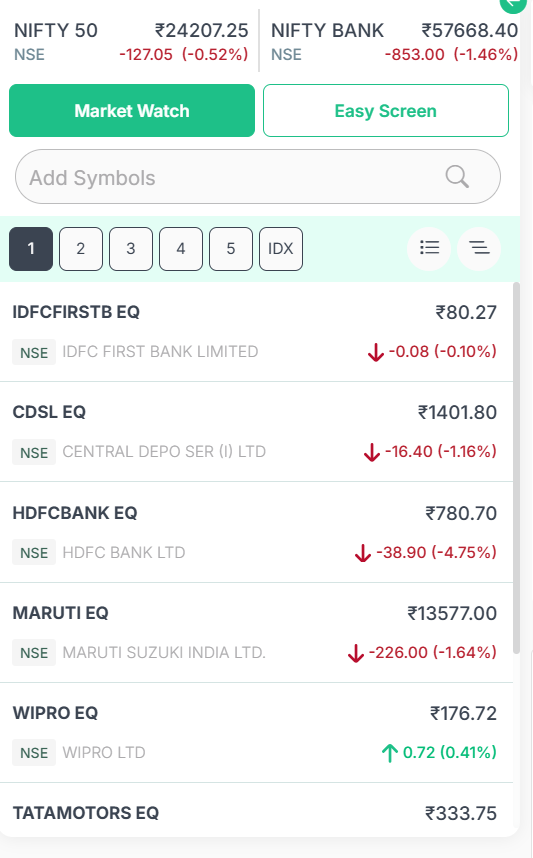
After logging into the ORCA app, navigate to the Watchlist and select the underlying asset you wish to trade, such as Nifty 50 . Selecting the asset opens its Overview page, where you can access additional market information. Swipe up on the Overview screen and tap Option Analysis to open the Option Chain . The Option Chain displays available strike prices along with their corresponding Call and Put option contracts, allowing traders to evaluate different contracts before initiating a trade.


Select a Strike Price and Review the Option Contract
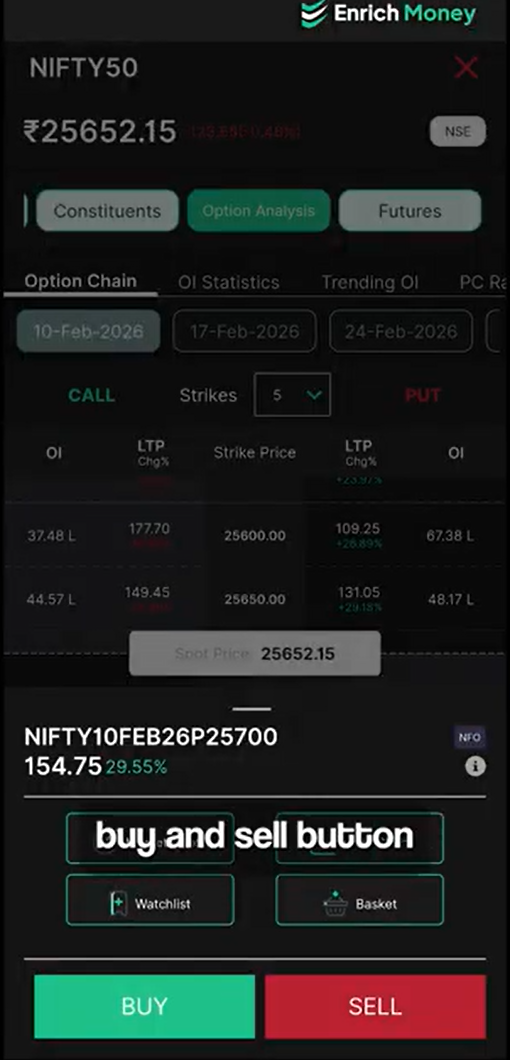
Within the Option Chain, browse the available strike prices and select the option contract that matches your trading strategy . For example, if your market analysis indicates a bearish outlook, you may choose a Put Option by selecting the preferred strike price, such as 25,700. Once a strike price is selected, the Buy and Sell options become available, allowing you to proceed with the trade . Before placing the order, traders can access Market Depth to review bid and ask prices, helping them better understand current market activity before execution.
Additionally, the selected option contract can be:
-
Added to a Watchlist for quick access.
-
Added to a Basket to organise multiple trades and review potential margin benefits before execution.
Place an Intraday Options Order
After selecting the desired option contract, tap Buy to open the order window.
To place an intraday trade:
-
Select Intraday as the Product Type.
-
Enter the desired order quantity.
-
Choose the preferred order type, such as Limit Order, if required.
-
Enter the price at which you want the order to be executed.
-
Optionally, specify a conditional price based on your trading strategy.
-
Review the order details and tap Buy to submit the order.
Once you've entered all the required details, review the order carefully before submitting it through your trading account. The ORCA app enables a smooth order placement experience by keeping all the necessary trading tools in one place.


Trade Directly from Charts, Watchlists, or Basket
The ORCA app offers multiple ways to access and execute option trades . Apart from the Option Chain, traders can open the selected option contract in the Chart view to perform technical analysis before placing an order. Contracts can also be saved to a Watchlist for continuous tracking or managed through the Basket, where users can review potential margin benefits before execution . This flexibility enables traders to analyse, organise, and execute trades from the interface that best suits their workflow.


Intraday Trading Timings
When placing an options trade, ensure that the Product Type is selected as Intraday . Traders can place orders at the prevailing market price or specify a preferred limit price. Intraday options trading is available during regular market hours, from 9:15 AM to 3:30 PM . Any intraday positions that remain open at the end of the trading session are automatically squared off by the system before market close if they are not closed manually.
Conclusion
The ORCA app provides a seamless workflow for intraday options trading by integrating the Option Chain, Market Depth, Charts, Watchlists, Basket, and order placement into a single platform. With quick access to strike prices, flexible order entry options, and multiple ways to monitor option contracts, traders can efficiently analyse opportunities and execute trades through the ORCA mobile app . If you're looking for an online trading app that simplifies option chain analysis and intraday options trading, ORCA offers an intuitive platform to analyse contracts, manage trades, and execute orders with confidence.
Frequently Asked Questions
How do I access the Option Chain in the ORCA app?
Go to your Watchlist, select the desired asset, and tap Option Analysis from the Overview page to open the Option Chain.
Can I check market prices before placing an options trade?
Yes. You can view Market Depth to check the current bid and ask prices before placing your order.
How do I place an intraday options trade in ORCA?
Select an option contract, tap Buy, choose Intraday as the product type, enter the order details, review them, and submit the order.
What are the trading hours for intraday options?
Intraday options trading is available during market hours, from 9:15 AM to 3:30 PM.
What happens if I do not close my intraday position?
Any open intraday position is automatically squared off by the system before the market closes if it is not closed manually.
Disclaimer: This blog is dedicated exclusively for educational purposes. Please note that the securities and investments mentioned here are provided for informative purposes only and should not be construed as recommendations. Kindly ensure thorough research prior to making any investment decisions. Participation in the securities market carries inherent risks, and it's important to carefully review all associated documents before committing to investments. Please be aware that the attainment of investment objectives is not guaranteed. It's important to note that the past performance of securities and instruments does not reliably predict future performance.