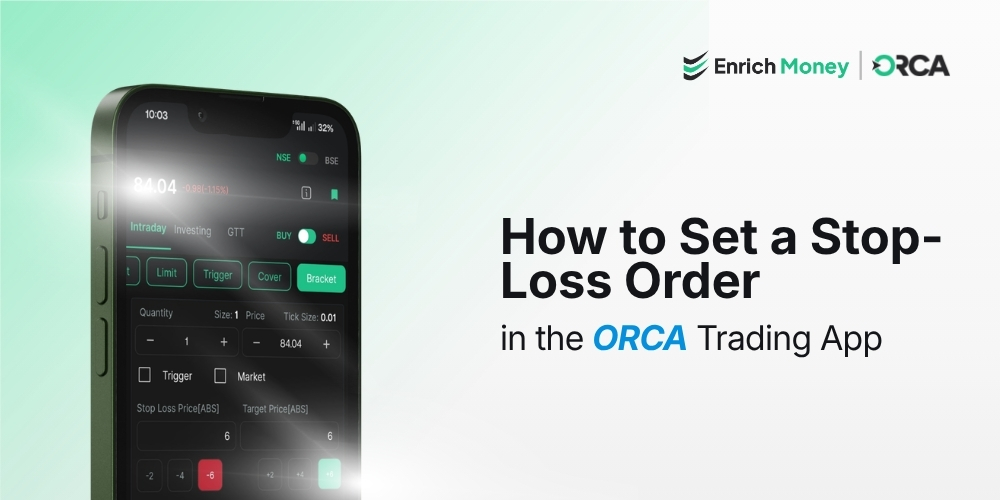
How to Set a Stop-Loss Order in the ORCA Trading App
Introduction
A stop-loss order is one of the most effective risk management tools available to traders. It helps limit potential losses by automatically triggering an order when the price of a stock or other security reaches a predefined level. Whether you're an active intraday trader or a long-term investor, using a stop-loss can help protect your capital and remove emotional decision-making during volatile market conditions . If you're looking for the best trading app for beginners, the ORCA Trading App by Enrich Money makes it easy to place and manage Stop-Loss (SL) and Stop-Loss Market (SL-M) orders. Whether you're entering a fresh trade or adding protection to an existing position, ORCA offers a simple and intuitive workflow to help you manage risk efficiently . This guide explains how to set a stop-loss order in the ORCA Trading App for both new orders and existing positions.
Open the Watchlist or Positions to Set a Stop-Loss

The process of placing a stop-loss order depends on whether you're opening a new trade or protecting an existing position.
-
For a new trade, open the Watchlist from the bottom navigation bar and select the stock or security you want to trade.
-
For an existing position, open the Positions section to add or modify a stop-loss order for securities you have already bought or sold.
This flexibility allows traders to manage risk before entering a trade or after a position has already been created.
Place a Stop-Loss Order for a New Trade

After selecting the desired stock from your Watchlist, tap Buy or Sell based on your trading strategy. The order window provides multiple order types, including Stop-Loss Limit (SL) and Stop-Loss Market (SL-M).
Understanding SL and SL-M Orders
|
Feature |
Stop-Loss (SL) |
Stop-Loss Market (SL-M) |
|
Execution |
Executes at the specified limit price after the trigger is reached |
Executes at the prevailing market price after the trigger is reached |
|
Best For |
Traders who want more control over execution price |
Traders who prioritise order execution during volatile markets |
After selecting the appropriate stop-loss order type, enter the following details:
-
Quantity
-
Trigger Price
-
Limit Price (required only for SL orders)
-
Order Validity
Review all the order details carefully before confirming the trade through your trading account. Once submitted, the stop-loss order will help protect your position if the market moves against your expectations.
Add a Stop-Loss to an Existing Position
If you've already purchased or sold a stock, you don't need to place a new order to add protection.

Open the Positions section from the ORCA app and select the position you want to manage. Choose Add Stop-Loss or Exit, depending on your trading requirement.

Select either the SL or SL-M order type, enter the trigger price along with the necessary order details, and review the information before confirming the order. This allows you to protect your existing position while continuing to monitor market movements.
Example: How a Stop-Loss Order Works
Suppose you purchase a stock at Rs.65 and want to limit your downside risk.
You configure the stop-loss as follows:
-
Trigger Price: Rs.60
-
Limit Price: Rs.59.95
If the stock price falls to Rs.60, the stop-loss order becomes active. Since this is a Stop-Loss Limit order, ORCA attempts to execute the sell order at approximately Rs.59.95 or better, depending on market liquidity and available buyers . Using predefined exit levels helps traders manage risk systematically rather than making decisions under market pressure.
Stop-Loss Orders for Intraday and Delivery Trades
|
Trading Type |
Stop-Loss Available |
Key Consideration |
|
Intraday |
Yes |
Positions are generally squared off before the market closes if not exited manually. |
|
Delivery/Investing |
Yes |
Stop-loss orders remain active based on the selected validity until executed or cancelled. |
Best Practices for Using Stop-Loss Orders
Using a stop-loss effectively is just as important as placing one. Consider these best practices while trading:
-
Use SL-M orders when trading highly volatile securities where execution is more important than obtaining an exact price.
-
Avoid placing stop-loss levels too close to the current market price, as normal price fluctuations may trigger the order unnecessarily.
-
As your trade moves in your favour, consider adjusting your stop-loss higher to lock in profits using a trailing stop-loss approach.
-
Base your stop-loss levels on your trading strategy, technical analysis, or support and resistance levels rather than emotions.
-
Always review the trigger price, quantity, and validity before submitting the order.
-
Avoid changing your stop-loss frequently based on emotions. Instead, revise it only when your trading strategy or market conditions justify the change.
Following these practices can help improve discipline and support more consistent risk management.
Why Stop-Loss Orders Matter
No matter how carefully a trade is planned, market prices can move unexpectedly. A stop-loss order helps define your maximum acceptable loss before entering a trade, allowing you to manage risk in a disciplined manner . Instead of reacting emotionally to sudden price movements, traders can rely on predefined exit levels to manage risk more systematically. Whether you're trading equities or derivatives, incorporating stop-loss orders into your trading plan is considered one of the fundamental principles of responsible trading.
Conclusion
Setting a stop-loss order is an essential part of effective risk management for both beginners and experienced traders. The ORCA Trading App simplifies the process by allowing users to place Stop-Loss Limit and Stop-Loss Market orders for both fresh trades and existing positions through an intuitive interface. By using stop-loss orders consistently, traders can better control potential losses and trade with greater confidence . Open an equity trading account with Enrich Money and experience the ORCA Trading App, designed to help you place stop-loss orders, manage risk efficiently, and trade with confidence.
Frequently Asked Questions
How does a stop-loss order work in the ORCA Trading App?
A stop-loss order automatically places a buy or sell order when the market price reaches a trigger level set by the trader. In the ORCA Trading App, this feature helps manage downside risk by exiting a position once the specified conditions are met.
Which is better: Stop-Loss (SL) or Stop-Loss Market (SL-M)?
The choice depends on your trading strategy. An SL order lets you specify the execution price after the trigger is activated, offering more price control. An SL-M order executes at the prevailing market price after the trigger is reached, making it a preferred option when quick execution is important.
Can I add a stop-loss after I have already entered a trade?
Yes. If you already hold an open position, you can add a stop-loss through the Positions section in the ORCA Trading App. This allows you to protect your existing trade without placing a new buy or sell order.
Is a stop-loss available for both intraday and delivery trades?
Yes. The ORCA Trading App supports stop-loss orders for both intraday and delivery trades. However, intraday positions are generally closed before the market session ends if they are not exited manually, while delivery trades follow the selected order validity.
Why is placing a stop-loss considered a good trading practice?
A stop-loss helps define your maximum acceptable loss before entering a trade. It supports disciplined trading by reducing emotional decisions, protecting capital during volatile market movements, and encouraging a structured approach to risk management.
Disclaimer: This blog is dedicated exclusively for educational purposes. Please note that the securities and investments mentioned here are provided for informative purposes only and should not be construed as recommendations. Kindly ensure thorough research prior to making any investment decisions. Participation in the securities market carries inherent risks, and it's important to carefully review all associated documents before committing to investments. Please be aware that the attainment of investment objectives is not guaranteed. It's important to note that the past performance of securities and instruments does not reliably predict future performance.