What Are GTT Orders and How to Place Them on the ORCA Web Platform?
Introduction
Monitoring stock prices continuously is not always practical, especially when a trading decision depends on a specific price level. Good Till Triggered (GTT) orders allow traders and investors to set predefined conditions in advance. Once the trigger condition is met, the order is automatically placed on the exchange . The ORCA Web platform allows users to create Single Trigger and OCO (One Cancels the Other) GTT orders based on their trading requirements. A GTT order stays active for up to one year from the placement date, giving users more flexibility to execute planned trades without continuously tracking the market . Investors comparing the top 5 apps for stock trading in India may also consider features such as order types, trading tools and automated order-management facilities.This guide explains what GTT orders are, their types and how to place them on the ORCA Web platform.
What Is a GTT Order?
A Good Till Triggered (GTT) order is an order instruction that remains active until a predefined trigger condition is met . When the trigger price is reached or breached, a limit order is placed on the exchange, provided sufficient funds or holdings are available. ORCA also sends notifications to the registered email ID and mobile number when a GTT is triggered and an order is placed.A GTT can be used for both buy and sell transactions.
Buy GTT
A Buy GTT allows users to create a trigger for purchasing an instrument. When the trigger price is reached, the specified buy limit order is placed on the exchange, subject to sufficient funds being available.
Sell GTT
A Sell GTT can be used to exit holdings or short-sell F&O contracts. Users can place a target order or combine target and stop-loss conditions using an OCO GTT. For equity holdings, the required shares must be available in the demat account for the sell order to be executed.
Types of GTT Orders
1. Single Trigger
A Single Trigger allows users to set one trigger price. The order is placed when the Last Traded Price (LTP) matches or breaches the specified trigger price.It can be used to enter a new position or exit an existing one.
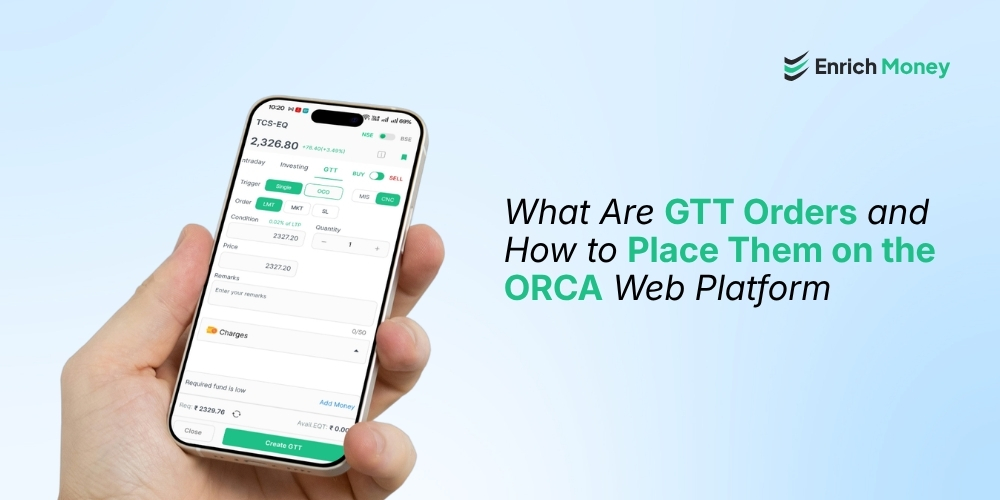
Example: Consider a stock currently priced at ?347.20. A trader can define a GTT trigger to buy or sell the stock when it reaches the specified price.The trader can select Single, enter the required condition price, quantity and applicable price details, and click Create GTT. Once the specified trigger condition is fulfilled, the corresponding order is automatically submitted to the exchange.

2. One Cancels the Other (OCO) Trigger
An OCO (One Cancels the Other) trigger allows users to set two conditions simultaneously—a target price and a stop-loss price . When either trigger is activated, the corresponding order is placed on the exchange and the other trigger is automatically cancelled. This can help automate profit booking and risk management . In the ORCA interface, the OCO window displays separate sections for Trigger 1 and Trigger 2, where the required conditions can be entered.

How to Place a GTT Order on the ORCA Web Platform
There are two ways to initiate a GTT order on the ORCA Web platform: through the Buy or Sell option for the selected instrument.
Step 1: Select the Instrument
Add the desired script to Market Watch. Select the instrument and click Buy or Sell, depending on the intended transaction.

Step 2: Select GTT
In the order window, select GTT. The interface provides options to create either a Single or OCO trigger.The GTT window also displays options for selecting the order type and product type.

The ORCA Web platform provides these order-placement features through its browser-based interface, making it a useful trading website for users who prefer managing their trades online.
Step 3: Select the Trigger Type
Choose the required GTT trigger:
-
Single – for one trigger condition.
-
OCO – for two trigger conditions.
For an OCO GTT, provide the relevant order details separately for Trigger 1 and Trigger 2.

Step 4: Select the Order and Product Type
The GTT window provides the following Order Type options:
-
Market
-
Limit
-
Trigger
Users can also select the applicable Product Type:
-
Intraday
-
Investing
Select the appropriate options according to the intended transaction.

Step 5: Enter the Order Details
Enter the required Condition Price, Quantity and Price. The fields shown may vary based on the order type selected, with options such as Trigger Price appearing where applicable.For an OCO GTT, enter the relevant conditions separately for Trigger 1 and Trigger 2. Review all the values carefully before proceeding.

Step 6: Create the GTT
Before submitting the GTT, review the exchange, Buy/Sell selection, trigger type, order type, product type, condition price, quantity and applicable price details. Once the information is correct, click Create GTT.

The GTT remains active until the trigger condition is met, the order is cancelled or modified, or the one-year validity period expires.
Example of a GTT Order
Suppose a stock is trading at around Rs. 347.20, and a trader wants to create a GTT based on a predefined price condition . The trader can open the instrument from Market Watch, select Buy or Sell, choose GTT, and then select Single. The required condition price, quantity and applicable order details can then be entered before clicking Create GTT . If the trader wants to set both a target and stop-loss, they can choose OCO and enter the two conditions separately under Trigger 1 and Trigger 2. When one condition is triggered, the corresponding order is placed and the other trigger is cancelled.
Things to Keep in Mind
Before placing a GTT order, consider the following:
-
A GTT order is valid for one year from the date of placement.
-
GTT orders can be placed at any time of the day, but the system triggers and places the order only during market hours.
-
When the trigger price is reached or breached, a limit order is placed on the exchange.
-
Buy orders require sufficient funds, while sell orders require sufficient holdings.
-
Sell GTT orders against equity holdings require CDSL TPIN authorisation, unless POA or DDPI has already been submitted.
-
GTT orders are self-managed. Users must place, modify or cancel them themselves, as dealer-assisted support is not available for GTT.
-
Notifications are sent to the registered email ID and mobile number when a GTT is triggered and an order is placed.
-
The order history of a triggered GTT is visible only on the day of execution and will not be available in order history on subsequent days.
Conclusion
GTT orders on the ORCA Web platform allow traders and investors to plan trades around predefined price conditions without continuously monitoring the market. With Single and OCO triggers, users can create entry, exit, target and stop-loss strategies based on their trading requirements . When evaluating top stock brokers in India, investors may also consider platforms that offer practical order-management tools such as GTT alongside their other trading facilities. ORCA's GTT functionality provides a structured way to plan and manage trades through predefined trigger conditions.
Frequently Asked Questions
What is a GTT order?
A Good Till Triggered (GTT) order remains active until a predefined trigger condition is met. Once triggered, the corresponding limit order is placed on the exchange.
How long is a GTT order valid?
A GTT order is valid for one year from the date of placement.
What is the difference between Single and OCO GTT?
A Single GTT has one trigger condition, while an OCO GTT allows users to set two conditions, such as a target and stop-loss. When one OCO trigger is activated, the other is cancelled.
Can I place a GTT order outside market hours?
Yes. GTT orders can be created at any time, but the system triggers and places the order only during market hours.
Can GTT be used for both buying and selling?
Yes. ORCA supports both Buy GTT and Sell GTT, subject to applicable funds, holdings and trading requirements.
Disclaimer: This blog is dedicated exclusively for educational purposes. Please note that the securities and investments mentioned here are provided for informative purposes only and should not be construed as recommendations. Kindly ensure thorough research prior to making any investment decisions. Participation in the securities market carries inherent risks, and it's important to carefully review all associated documents before committing to investments. Please be aware that the attainment of investment objectives is not guaranteed. It's important to note that the past performance of securities and instruments does not reliably predict future performance.